

Tardy Management
Stop chasing tardies.
Capture infractions at kiosks, from staff, or from you attendance files, then let your consequence ladder run itself. Included free with Securly Pass.
Schools experience a 35% reduction in tardies with Securly Pass.
Source: 2025 Pass customer survey
Tardy policies fail in the gap between the handbook and the hallway
Most schools have a tardy policy. Fewer have a system that enforces it the same way for every student, every period, every day. When tracking lives in paper slips and teacher memory, counts get lost, consequences get skipped, and students learn quickly that the policy is negotiable. Securly Pass Tardy Management closes that gap with one system that records every infraction and applies your ladder exactly as written.
Capture every tardy, everywhere it happens
One system for Late to School and Late to Class
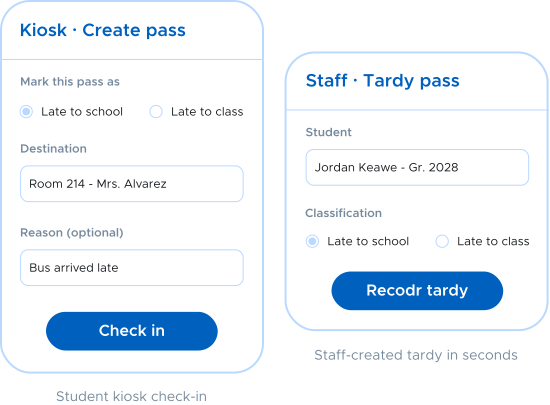
Tardy Management tracks two infraction types and captures them however your building works. Students check in at a kiosk or create their own late pass when you allow it. Staff record a tardy in seconds, or classify a pass after the fact. Running a morning sweep from your attendance system? Upload tardy records by file and Pass counts them the same way.
Consequence ladders that run themselves
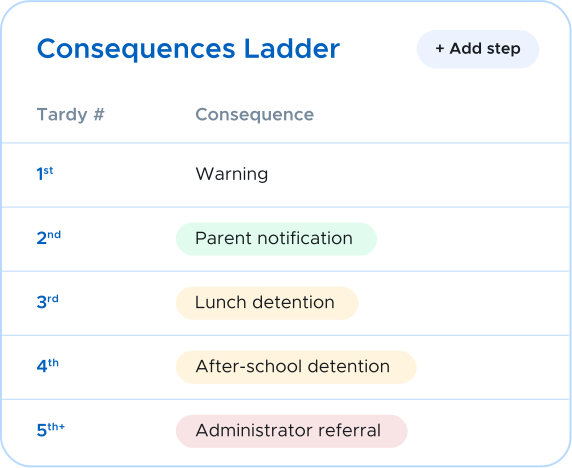
Set the ladder once. Pass enforces it every time.
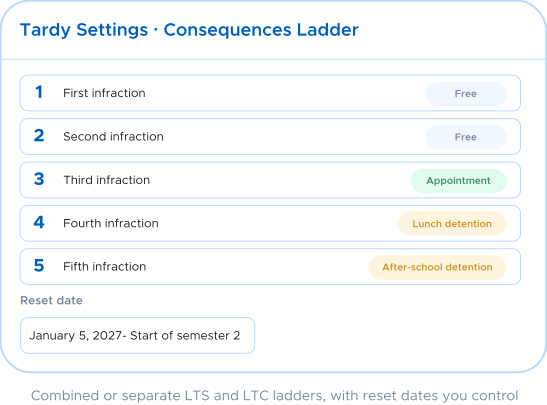
Define your consequence ladder step by step, with a detention or appointment attached to each threshold. Run one combined ladder or separate ladders for Late to School and Late to Class, and set reset dates that restart counts by semester, quarter, or any cycle you choose. When a student's infraction count reaches a detention step, Pass automatically assigns them to an eligible detention date based on your scheduling lead time, room capacity, calendar, and grade-year eligibility. Students can even see their own ladder level, so the next consequence is never a surprise.
Detentions without the spreadsheet
Scheduling, capacity, and rosters handled
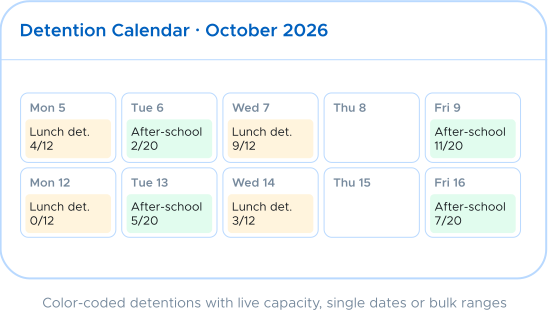
Build detention definitions with a room, start time, duration, capacity limit, eligible graduation years, and the calendar dates they run. Scheduled detentions become standard Pass appointment passes, so students get the same appointment experience they already know, complete with reminders. Administrators can view, reschedule, or cancel any detention and download rosters by date. If no eligible slot exists, the consequence stays pending for your team to handle instead of silently disappearing.
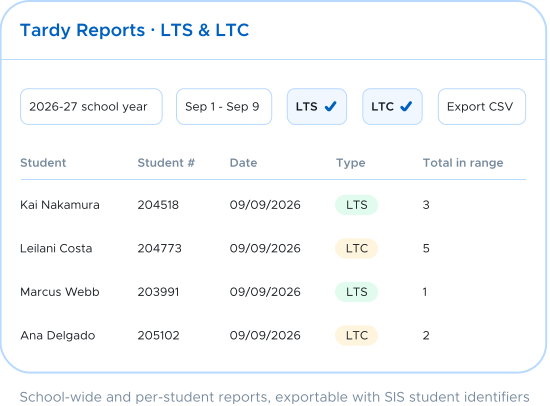
See the pattern, not just the pile
Tardy reporting from the whole school down to one student
Filter infractions by Late to School, Late to Class, or both across any date range. Drill into a single student's full tardy record with dates, arrival times, classifications, and current ladder step. Watch aggregate trends by hour, day, week, or month, and compare the current period against the previous one to see whether your interventions are working. Every report exports for your admin team, attendance meetings, and family conversations.
How it works
From late arrival to logged consequence in three steps

Step 1: Record
You choose what works best for your school: A student checks in at a kiosk, staff creates a tardy pass, or you can upload the morning's records.

Step 2: Count
The infraction advances the student's step on your consequence ladder. Combined or separate LTS and LTC counting, with reset dates you control.

Step 3: Enforce
When a step carries a detention, Pass assigns the student to an eligible date automatically and adds it as an appointment pass. Rosters, reports, and trends update as you go.
One platform for student movement
Tardy management inside the platform
that already runs your hallways
Standalone tardy systems add another login, another kiosk, and another invoice. Securly Pass Tardy Management lives inside the hall pass platform your staff and students already use every day. Tardies show up in the same pass history, detentions run as the same appointments, and your front office manages it all from one place. One system for student movement, from the first bell to the last.
"Pass is a product that I honestly don't know how we would function as a building without. With countless decisions to make and monitor throughout a day, Pass provides the right tools that allow our staff, teachers and admin team to monitor our building more effectively, increase our safety, have accurate data for decision making and have an overall pulse on movement throughout the building at a moment's notice." — Stacie Kegley, Instructional Coach, Ballyshannon Middle School
Tardy Management FAQs
The basics on how Tardy Management works inside Securly Pass
See Tardy Management in action
Join the thousands of schools using Securly Pass to manage student movement, behavior, and tardies from one platform.